How I Design Event Branding Packages from Scratch (Real Project Walkthrough)
A few months ago, I got a call from a client who needed the full event branding design done for a corporate meet and greet — stage LED panels, backdrop, standees, invitation cards, and cue cards. Everything. The event was at a luxury hotel in Bengaluru, and the client wanted it to look premium from every angle.
That project reminded me how much goes into event branding design that most people never think about. It is not just making things look pretty. Every element — from the 20-foot LED backdrop on stage to the small cue card the host holds in their hand — has to feel like it belongs to the same visual family.
In this post, I am going to walk you through exactly how I approach event branding design projects. What I think about before opening Photoshop, what deliverables are in a typical package, my actual workflow, the tools I use, and the mistakes that can ruin an otherwise great-looking event.
If you are a designer trying to understand how to structure your event branding design work, or a business owner planning an event and wondering what to ask your designer for — this is for you.
1. What Is Event Branding Design and Why Does It Matter
Event branding design is the process of creating a consistent visual identity for an event. That includes everything the audience sees, touches, and experiences — the stage, the signage, the printed materials, the social media posts, and even the small details like table cards or lanyards.
The goal is simple. When someone walks into the venue, they should instantly feel the personality of the brand. The colors, the fonts, the layout of the stage — all of it has to tell the same story.
I have seen events where the stage backdrop uses one color palette, the standees use a different one, and the invitation card looks like it was designed by a third team. That kind of inconsistency kills the premium feel no matter how expensive the venue is.
Good event branding design creates what I call visual harmony. Everything feels intentional. Nothing feels out of place.
2. How I Start Every Event Branding Design Project
Before I open any design software, I ask the client a set of questions. This is the most important step in any event branding design project and most designers skip it entirely.
Here is what I need to know:
- What is the nature of the event — corporate, product launch, awards, meet and greet, cultural?
- What is the client’s existing brand identity — logo files, brand colors, approved fonts?
- What is the venue like — indoor or outdoor, stage dimensions, lighting conditions?
- Who is the audience — corporate professionals, general public, youth crowd?
- What is the tone — formal and serious, energetic and fun, luxury and exclusive?
- What is the print budget — this directly affects what I can design and how complex the materials can be?
Once I have answers to all of this, I build what I call a Design Brief in my head. It is not always a formal document. For smaller projects, I just write key notes — primary color, mood reference, and a list of deliverables.
For the Bengaluru project I mentioned, the brief was clear. Luxury feel, dark background with gold accents, formal but energetic, and the client’s brand color was a deep navy blue. That gave me my direction before I ever touched a file.
3. The Core Deliverables in My Event Branding Design Package
A complete event branding design package has multiple deliverables. Here is what I typically include and how I approach each one.
3.1 Stage Backdrop and LED Wall Design
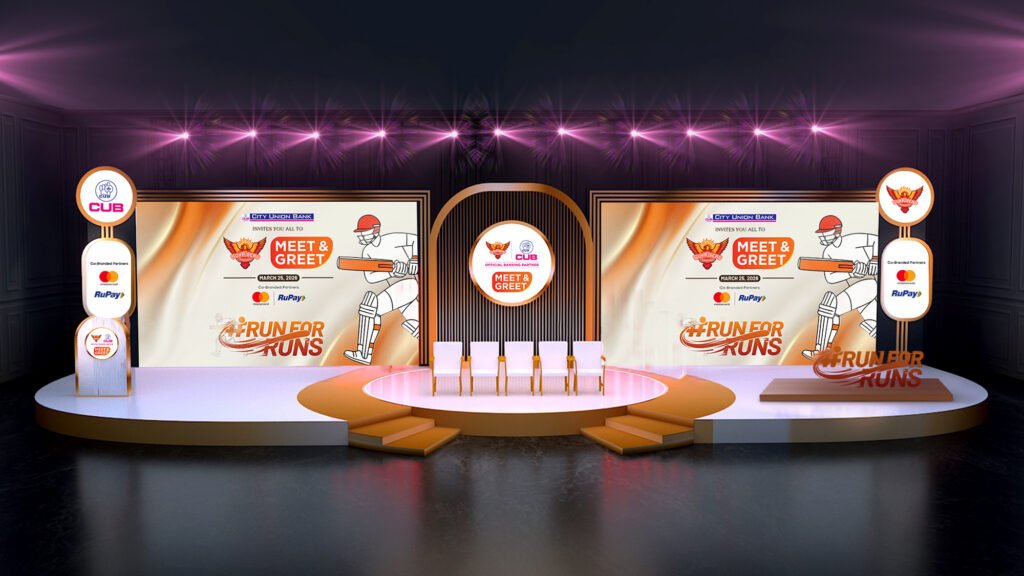
This is the most visible element in the entire event branding design. The stage backdrop or LED wall design is what everyone sees in photographs and livestreams. It has to be perfect.
For LED wall designs, I always work in the actual pixel dimensions of the display. A common mistake is designing at 1920×1080 for a screen that is actually 3840×2160 or some custom resolution. Always confirm the exact pixel spec with the AV team before you start.
I typically create two to three versions of the stage backdrop — a centered hero version with the brand logo and event name, a split version for panels, and sometimes a looping animation version if the LED supports dynamic content.
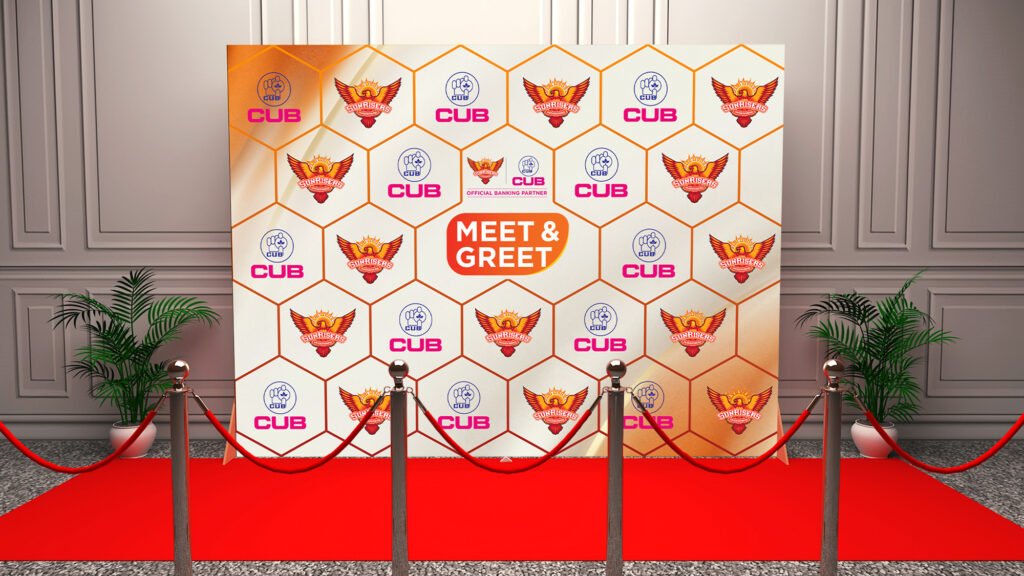
For print backdrops, the design needs to be at 150 DPI minimum at actual size. A 20-foot wide backdrop designed at 72 DPI will look blurry when printed. I always send the file to the printer and ask for a small sample print before the full run.
3.2 Standees and Roll-Up Banners
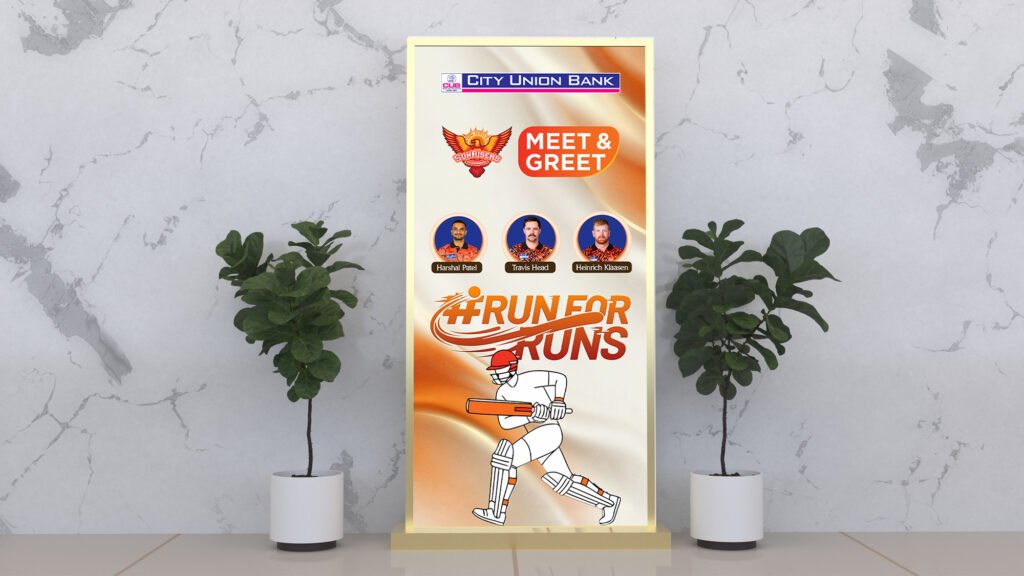
Standees and roll-up banners are the workhorses of event branding design. They guide people around the venue, reinforce the brand at entry points, and fill visual space in the background of photographs.
Standard standee size is 85cm x 200cm. I design all standees at this size unless the client specifies otherwise. The key rule I follow is the 60-30-10 visual split — 60% background/brand color, 30% imagery or graphic element, 10% text and logo.
Most designers make standees too text-heavy. At an event, no one reads a standee. They glance at it for two seconds. Your event branding design on a standee has to communicate in two seconds. Big logo, strong visual, and one clear message — that is it.
3.3 Event Invitation Design
The invitation is the first piece of event branding design the guest experiences. It sets expectations for the entire event. If the invitation looks premium, the guest assumes the event will be premium.
I design invitations in A5 or A4 size depending on the print budget. For high-end corporate events, I always recommend the client go for spot UV or foil stamping on the invitation. It is a small additional cost but dramatically elevates the perceived value of the event.
The invitation has to carry all the same visual DNA as the stage design — same colors, same fonts, same graphic elements. It should feel like it came from the same design family.
3.4 Cue Cards and On-Stage Materials
Cue cards are one of the most overlooked deliverables in event branding design. These are the cards the host or MC holds on stage. In close-up shots or livestream videos, these cards are clearly visible.
I design cue cards at A5 size with the event logo at the top, clear section headings, and enough white space for the speaker to add handwritten notes. The font needs to be large enough to read quickly — minimum 14pt for body text on a cue card.
I also include a printed schedule card, speaker intro cards, and award announcement cards depending on the type of event. All of these are part of the complete event branding design package.
3.5 Social Media Assets
Social media assets are often treated as an afterthought in event branding design. They should not be. These assets get shared before, during, and after the event and they reach a far larger audience than the people in the room.
I include the following social media assets in every event branding design package:
- Event announcement post (1080×1080 for Instagram, 1200×628 for LinkedIn and Facebook)
- Countdown posts (3 to 5 variations)
- Event day live post template
- Post-event recap template
- Instagram Story size (1080×1920) for pre-event promotion
All of these follow the same event branding design system — same colors, same typography, same graphic language as the physical materials.
4. My Actual Design Workflow Step by Step
Here is how I actually work through an event branding design project from start to finish.
Step 1 — Collect all brand assets. I ask the client for logo files in AI or EPS format, brand color codes in HEX and CMYK, approved fonts, and any reference images they like. I never start designing without the original logo file. Using a PNG logo on a large format backdrop is a disaster waiting to happen.
Step 2 — Create a master color palette. I take the client’s brand colors and build an extended palette for the event — primary, secondary, accent, and neutral. For the Bengaluru project, the client’s navy blue became the primary, gold became the accent, and off-white became the neutral background tone.
Step 3 — Design the stage backdrop first. I always start with the biggest and most visible element. The stage backdrop is the anchor of the entire event branding design. Once this is approved, everything else flows from it.
Step 4 — Cascade the design to other materials. Once the backdrop is locked, I move to standees, then invitation, then cue cards, then social media assets. Each one borrows from the previous — same graphic elements, same color ratios, same typography.
Step 5 — Create a print-ready and digital-ready version of everything. Print files go out as CMYK PDFs with 3mm bleed. Digital files go out as RGB PNGs or JPEGs at 150 DPI for screens.
Step 6 — Final client review and revisions. I send everything in a single organized folder with clear file names. Something like Event_Name_Backdrop_v1.pdf, Event_Name_Standee_Left_v1.pdf and so on. Clean file naming is part of professional event branding design delivery.
5. Tools I Use for Event Branding Design
Adobe Photoshop is my primary tool for event branding design. All large format work — stage backdrops, standees, print banners — I do in Photoshop. The layer organization and smart object system makes it easy to manage complex compositions.
Adobe Illustrator is where I do all vector work. Any element that needs to scale perfectly — logos, typography treatments, geometric graphic elements — these are built in Illustrator and then placed into Photoshop as smart objects.
For social media assets, I work in Photoshop but I always keep a template structure so I can quickly swap out copy and images for different posts without rebuilding the design.
For presentations and client mockups, I use Photoshop’s perspective warp and mockup smart objects to show the client what the stage backdrop will actually look like in a venue setting. This is a small step that builds a lot of client confidence before the files go to print.
For LED animations, I use Adobe After Effects for simple looping motion graphics — animated logo reveals, ticker text, and background motion elements.
6. Common Mistakes to Avoid in Event Branding Design
After working on dozens of event branding design projects, here are the mistakes I see most often — and that I have made myself in my early days.
Using RGB colors for print files. This is the most common and most damaging mistake. Colors look very different in CMYK print versus RGB screen. Always convert to CMYK before sending to the printer, and always ask for a proof print before the full run.
Designing without knowing the actual dimensions. Every standee company and every LED display has slightly different specs. Designing a standee at 85x200cm for a display that actually requires 90x210cm means your design gets cropped or stretched. Always confirm dimensions with the vendor before you design.
Using too many fonts. One display font for headings, one clean sans-serif for body text. That is all you need in event branding design. Using three or four different fonts makes everything look chaotic and amateur.
Leaving no safe zone on large format prints. Always keep important elements — logos, text, key graphics — at least 5cm away from the edge on large format prints. Printers are not perfectly precise, and stage backdrops get mounted with clamps that can cover the edges.
Ignoring the lighting conditions at the venue. A design that looks great on screen can look completely washed out or overly dark under harsh stage lighting. If possible, visit the venue or get venue lighting specs before finalizing colors. Dark backgrounds with high-contrast elements tend to perform best on stage.
7. How Much Does Event Branding Design Cost in India
This is the question every client asks and every designer avoids answering clearly. So here is my honest take on event branding design pricing in India.
A basic event branding design package — stage backdrop, two standees, and a social media post — starts at around ₹15,000 to ₹25,000 for a freelance designer in India.
A mid-range event branding design package — stage backdrop, LED design, 4 to 6 standees, invitation card, cue cards, and social media assets — typically ranges from ₹35,000 to ₹75,000 depending on the complexity and number of revisions.
A premium full-service event branding design package — everything above plus animation for LED screens, print coordination, and on-site support — can go from ₹1,00,000 upward for large corporate events.
These numbers will be different if you hire a design agency instead of a freelancer. Agencies typically charge 2x to 3x more for the same deliverables, but they also bring a team, a more structured process, and accountability that individual freelancers may not always offer.
What I tell every client is this — do not cut corners on the stage backdrop. That is what will be in every photo and video from the event. It is worth spending properly on that one element even if you trim the budget on other items.
8. Final Thoughts
Event branding design is one of the most satisfying types of design work I do. You get to see your work at real scale, in a real venue, in front of a real audience. There is nothing quite like walking into an event and seeing the stage backdrop you designed filling the entire back wall of a hall.
The key to doing it well is treating event branding design as a system, not a collection of separate files. Every deliverable — from the 20-foot LED wall to the A5 invitation card — should be a piece of the same visual puzzle.
Start with the biggest element, nail it, and then cascade that design language across everything else. Ask the right questions before you open any software. Respect the print specs. And always deliver clean, organized files.
If you are planning an event and need a designer who understands the full picture — from the stage to the social media posts — feel free to reach out via my contact page. I have worked on event branding design projects across corporate, cultural, and brand activation categories and I would be happy to discuss what your project needs.
And if you are a designer reading this to improve your own event branding design process — I hope this walkthrough gives you a practical framework you can actually use on your next project.
Frequently Asked Questions About Event Branding Design
What is included in an event branding design package?
A complete event branding design package typically includes stage backdrop design, LED wall graphics, standees, roll-up banners, invitation cards, cue cards, and social media assets. The exact deliverables vary based on the event type and budget.
What software is best for event branding design?
Adobe Photoshop and Illustrator are the industry standards for event branding design. Photoshop handles large format files and raster artwork, while Illustrator is used for vector elements, logos, and typography treatments.
How far in advance should I hire a designer for event branding design?
Ideally, you should engage a designer at least 3 to 4 weeks before the event. Large format prints need time for production and delivery. Rushing the timeline usually means less time for revisions and a higher risk of errors going to print.
What resolution should event backdrop designs be?
For print backdrops, design at 150 DPI at actual print size. For LED wall designs, work at the exact pixel resolution of the display — confirm this with your AV vendor before starting the design.
How do I make event branding design look consistent across all materials?
Start by building a master design system — define your color palette, typography, and graphic elements before you design any individual piece. Apply this system consistently across every deliverable in the event branding design package.