How I Choose Website Colors: A Practical System for Building Palettes That Work in Real Interfaces
Choosing five attractive colors is easy. Building a color system that still works across navigation, buttons, cards, text, backgrounds and real content is much harder. This is the process I use to evaluate website color palettes and why I built the Color Palette Generator and Extractor around color roles rather than random swatches.
Nitin Monga
Designer · Developer · 3D Artist
A color palette is not a collection of nice colors
One of the most common mistakes I see when choosing colors for a website is starting with swatches instead of roles.
A designer finds four or five colors that look good together, places them in a row and calls that the brand palette.
The problem appears when those colors have to do actual work.
Which one becomes the page background?
Which one handles normal paragraph text?
Which color belongs on primary buttons?
What happens inside cards?
Can the accent color carry readable text?
Does the palette still work when the page contains a form, pricing cards, navigation, testimonials and a footer?
A palette only becomes useful when its colors have responsibilities.
That is the thinking behind the Color Palette Generator and Extractor I built.
Instead of looking at color as a decorative decision, I prefer to think about it as a small system.
The five roles I normally start with
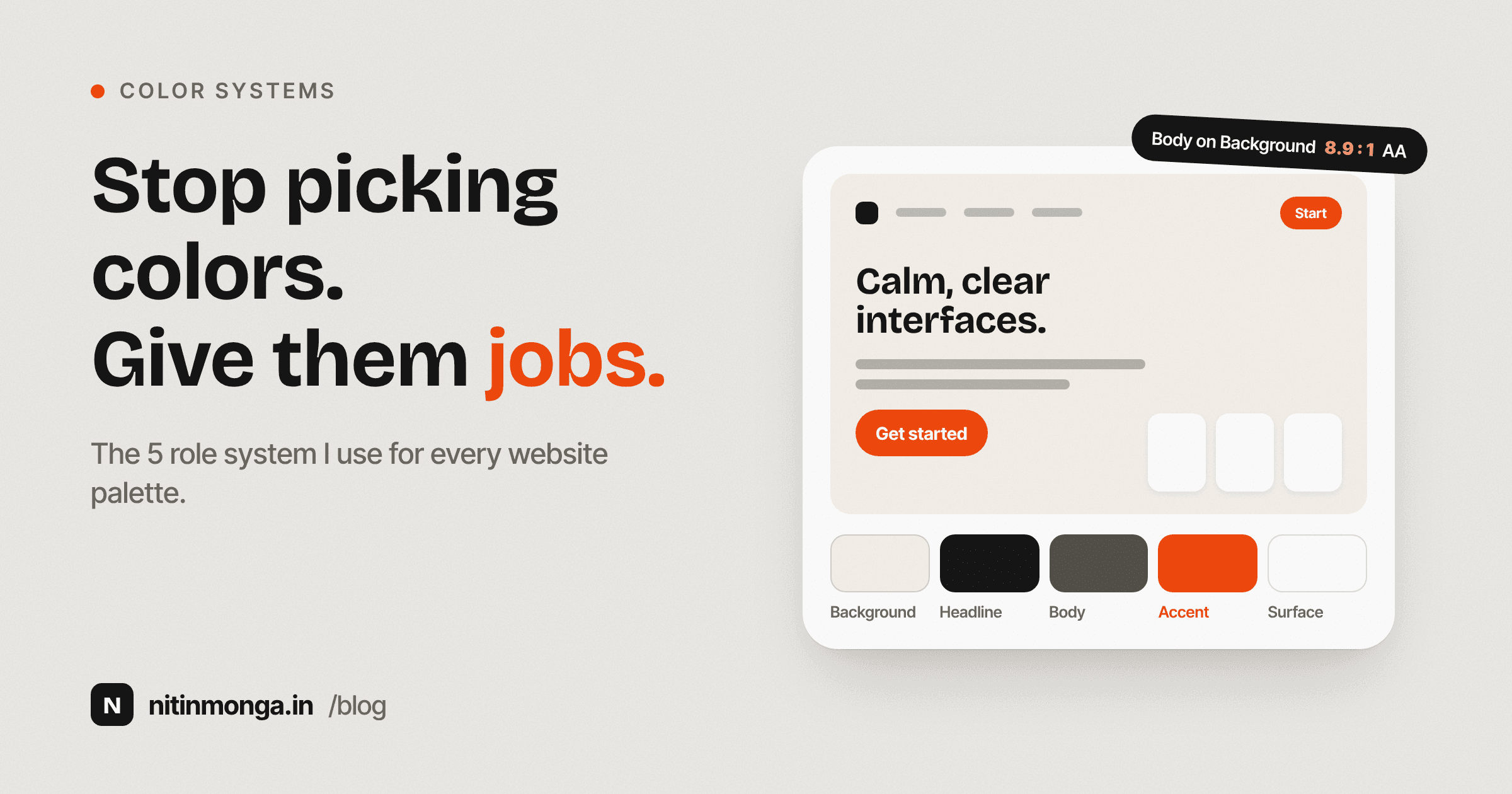
For most websites, I can understand a palette surprisingly well with five basic roles.
The first is the background.
This is the canvas. It covers large areas of the interface and usually needs to stay quiet enough for the content above it to remain comfortable.
The second is the headline color.
This is usually the strongest text color in the system. It needs enough contrast to create clear headings and give the page structure.
The third is the body color.
Body text does not always need to be identical to the headline color. In many interfaces, a slightly softer value creates enough separation between headings and paragraphs without making the text weak.
The fourth is the accent.
The accent handles actions, important links, highlights and selected states. It is usually the color with the strongest brand personality.
The fifth is the surface.
Cards, panels, forms, menus and other elevated areas often need a surface color that is slightly different from the main page background.
These five roles are not the complete color system for a large product, but they are a useful starting point.
They force you to answer a more important question than whether two colors look attractive beside each other.
They force you to decide what each color is for.
Why I prefer semantic colors
When developers build a page, there are two ways they can think about color.
The first is by value.
Use this hex code here. Use that hex code there.
The second is by purpose.
Use the background color. Use the text color. Use the accent color. Use the surface color.
The second approach scales much better.
If I decide later that the brand accent should become darker, I should be able to change one role and have the interface respond consistently.
I should not have to search through fifty components for a hardcoded blue value.
This is why design systems often use semantic naming.
A color gains meaning through its job.
The Color Palette Generator follows the same idea. You choose colors for specific roles rather than building an anonymous row of swatches.
Once those roles exist, it becomes much easier to evaluate whether the system actually works.
I never approve a website palette from swatches alone
A row of color circles tells me almost nothing about how a website will feel.
Colors behave differently when their proportions change.
An orange accent that looks balanced as a small square may become overwhelming when used across a large hero section.
A pale gray that looks elegant in a palette may make body text difficult to read.
A dark surface that works beautifully on a small card may become heavy when repeated ten times down a page.
This is why I built a full website preview into the palette tool.
I want to see the colors on navigation, headings, paragraphs, buttons, cards, testimonials and the footer.
The preview is where the palette stops being an abstract exercise.
I can immediately see whether the accent is too dominant.
I can see whether the body text is disappearing.
I can see whether the surface is different enough from the main background.
I can see whether a button looks like an action or just another colored rectangle.
Context changes everything.
Contrast has to be checked, not assumed
Designers become familiar with certain combinations that feel like they should be readable.
Dark gray on white.
White on blue.
Orange on cream.
But visual confidence is not a contrast measurement.
A color pair can look comfortable on a large heading while failing at paragraph size.
A brand color can work beautifully as a background but be unsuitable for small text.
For web interfaces, contrast is not something I want to leave entirely to my eye.
That is why the palette tool calculates contrast for important combinations.
The point is not to turn every palette into the highest contrast possible.
The point is to know what you are choosing.
If body text does not have enough contrast against the background, I want to find that before the website is built.
If the accent works for large text but not for a small button label, I want that information while I am still making the palette decision.
Color accessibility is easier to solve early than after a complete interface depends on the wrong values.
Good color systems usually use less color than expected
When a website looks visually rich, it is easy to assume that many colors are involved.
Often the opposite is true.
A controlled interface may use one main background, one surface, one strong text color, one softer text color and one accent.
The variety comes from proportion, typography, imagery, borders and spacing.
Adding another accent color is not always the answer.
When everything is colorful, nothing feels especially important.
I prefer to reserve the strongest accent for places that deserve attention.
Primary actions.
Selected navigation.
Important status information.
A small visual highlight.
If the same bright color appears in headings, backgrounds, decorative icons, buttons, badges and illustrations, it stops acting as an accent.
It becomes the environment.
That can work for some brands, but it should be intentional.
How I choose a background
The background creates the overall temperature of the page.
Pure white is useful, but it is not the only neutral.
A slightly warm white can make an editorial or lifestyle brand feel more tactile.
A cool off white can work well for technology products.
A dark navy can create a more controlled alternative to pure black.
The important part is what the background does to everything placed on top of it.
Does the text remain comfortable?
Do images look natural?
Does the accent become too aggressive?
Does the surface need to become lighter or darker to separate cards?
I often adjust the background before adjusting individual components because such a large percentage of the interface depends on it.
A small change in the page canvas can change how the entire palette feels.
How I choose text colors
One mistake I avoid is making body copy too light just because light gray looks minimal.
Minimal design is not the same as low contrast design.
Paragraph text has to survive actual use.
Long descriptions.
Small captions.
Feature cards.
Terms.
Form labels.
Navigation.
If body text requires effort to read, the interface is not becoming cleaner. It is becoming harder to use.
I generally want headline text to establish strong structure and body text to remain comfortable without competing with headings.
The difference between them can come from size, weight, tone or a combination of all three.
Color should support the typographic hierarchy, not carry the entire responsibility.
How I use accent colors
The accent is where brand personality often becomes most visible.
It is also the color I am most careful with.
An accent usually has to work across several situations.
As a button.
As a link.
As an icon.
As a small highlight.
Sometimes as a background.
One color may not perform equally well in every situation.
If a bright yellow is the brand accent, for example, it may be excellent for visual highlights but poor as a background behind white button text.
That does not mean the yellow is wrong.
It means the color system needs supporting values or different text treatment.
The palette should adapt to the brand, not force the brand into one rigid rule.
Surfaces create depth without decoration
A surface color is one of the quietest parts of a palette, but it can make a big difference.
Cards need to separate from the page.
Forms need a defined working area.
Menus need to appear above surrounding content.
A surface can achieve this with a small shift in value instead of a heavy shadow or strong border.
That is one reason I include a surface role in the tool.
It encourages the designer to think about how containers will actually work.
If the background and surface are identical, that may be fine, but it should be a decision.
If they are different, the difference should be visible without becoming distracting.
Extracting colors from images
Not every palette starts from scratch.
Sometimes the starting point is a photograph, logo, packaging reference or existing campaign.
In those cases, extracting dominant colors can be useful.
The important thing is not to treat extracted colors as a finished palette automatically.
A photograph may contain beautiful colors that are not suitable for text.
A logo may contain an accent but no neutral background.
An illustration may produce several similar tones that need to be simplified before they become useful in an interface.
I use extraction as a source of material.
Then I assign roles.
Which extracted color can become the accent?
Which should remain decorative?
Do I need new neutrals?
Which colors can support readable text?
Extraction gives me ingredients.
Design turns those ingredients into a system.
Why I included curated palettes
Sometimes you do not need to invent a palette from nothing.
You need a starting point.
I included curated palettes in the tool because they make experimentation faster.
You can see how different combinations change the entire personality of the same page.
A warm palette makes the layout feel different from a slate palette even though the typography and spacing have not changed.
A dark palette changes the visual weight of imagery and buttons.
A strong regional color combination can feel completely different from a quiet editorial system.
The useful part is not copying the palette blindly.
It is seeing relationships.
How dark is the headline compared with the background?
How much contrast does the accent have?
How close is the surface to the page canvas?
These relationships can be carried into your own brand.
Also read: drishti the anonymous gallery
Export should happen after the design decision
Once a palette works, it should be easy to use in development.
The tool allows the roles to be copied into formats such as CSS variables, Tailwind configuration and SCSS.
That part is intentionally simple.
The difficult work should happen before export.
Choosing roles.
Checking contrast.
Looking at real interface context.
Making sure the system feels coherent.
Once those decisions are solid, converting five values into code should not be complicated.
My practical palette review
Before I approve a website palette, I ask a few questions.
Can I identify the primary action immediately?
Can I comfortably read normal body text?
Does the accent have enough contrast where it is actually used?
Can I separate a card from the page without relying on excessive shadows?
Does the palette still feel consistent in the footer?
Do muted elements still remain readable?
If I remove all imagery, does the color system still create structure?
Does the interface have a clear neutral foundation?
Are the strongest colors reserved for meaningful moments?
This is a more useful review than asking whether the palette feels modern.
Modern changes.
Function is easier to evaluate.
Color trends should not control the system
Every few years a certain color treatment becomes dominant.
Pastel gradients.
Dark interfaces.
Bright neons.
Warm editorial neutrals.
Muted earth tones.
There is nothing wrong with using trends.
The mistake is allowing a trend to override the actual brand and interface requirements.
If a financial product needs clarity and confidence, the color system has a different responsibility from a youth entertainment product.
If a website contains long articles, the reading experience matters more than whether the palette looks impressive in a thumbnail.
I would rather build a palette that can survive several years than one that only looks current this month.
Also Read: What 12 Years of Client Work Taught Me About Scope Creep
Why I built the tool this way
I did not want another color generator that gives five random swatches and asks the designer to imagine the rest.
The part I care about is what happens after the colors are generated.
Do they work?
Can I read the text?
Does the CTA stand out?
Does the system still feel balanced across a complete page?
Can I hand the same roles to development?
That is why the tool combines palette selection, image extraction, semantic roles, live interface preview, contrast checks and code export.
It reflects the way I want to make color decisions in actual projects.
Final thoughts
A strong website palette is not defined by how interesting the swatches look.
It is defined by how reliably those colors perform once real content arrives.
The best palette gives the interface a clear background, readable text, useful surfaces and a controlled accent.
It creates hierarchy without making every component shout.
It supports accessibility instead of treating it as an afterthought.
It can move from design to code without losing meaning.
That is the standard I use when choosing colors.
Start with roles.
See the colors in context.
Measure important contrast.
Reduce anything that has no clear job.
Only then call it a palette.
Tagged
Nitin Monga
Graphic Designer, 3D Artist & Full-Stack Developer based in Punjab, India. Designing and building digital products since 2013.